CRM Logo

Event Management CRM for Better Attendee and Vendor Tracking

Managing an event business involves much more than organizing schedules and collecting registrations. Event teams are responsible for handling attendees, coordinating vendors, tracking communications, managing follow-ups, and ensuring all tasks are completed on time. When these processes are managed manually or across multiple platforms, it often creates confusion, delays, and operational gaps.

An event management CRM helps businesses organise everything in a centralised system. From managing attendee information to tracking vendor activities and internal workflows, a CRM enables event teams to work more efficiently and improve coordination across departments. Platforms like CRM HUB 360 help event businesses streamline daily operations, improve communication, and maintain better visibility throughout the event lifecycle.

Event management requires continuous coordination between clients, attendees, vendors, and internal teams. Without a structured system, important updates can be missed, tasks may remain pending, and communication can become inconsistent.

A CRM helps event businesses by:
  • Centralizing customer and event information
  • Managing attendee and vendor records in one place
  • Improving communication between teams
  • Tracking tasks, follow-ups, and deadlines
  • Reducing manual work through workflow automation
  • Providing better visibility into ongoing events

By organizing operations in a CRM, event planners can focus on delivering successful experiences rather than managing scattered data and repetitive administrative tasks.

Attendee experience plays a major role in the success of any event. A CRM helps event businesses manage attendee interactions from registration to post-event follow-ups

Registration Management

A CRM can help organize attendee details such as contact information, event preferences, ticket categories, and registration status in a centralized database. This makes it easier for teams to access accurate information whenever needed.

Communication Tracking

Keeping attendees informed is essential before, during, and after an event. CRM systems help businesses manage communication records, including emails, reminders, confirmations, and follow-ups, ensuring consistent engagement throughout the event process.

Attendance Monitoring

During events, teams can update attendee status and track participation activities internally. This helps organizers maintain better coordination and improve event management efficiency.

Post-Event Follow-Ups

After the event, businesses can continue engagement by managing feedback requests, follow-up communication, and future event outreach through the CRM platform.

Vendors are an important part of every successful event. Managing multiple vendors manually can become difficult, especially when handling deadlines, services, and communication simultaneously.
A CRM helps simplify vendor coordination by organizing all vendor-related information in one place.
Event businesses can maintain vendor details such as:
  • Contact information
  • Service categories
  • Event assignments
  • Previous interactions
  • Notes and documentation
This allows teams to quickly access vendor information whenever required.

Task and Deadline Tracking

Event planning involves multiple timelines and responsibilities. A CRM helps teams assign tasks, monitor progress, and track important deadlines to ensure smooth event execution.

Communication Management

Vendor discussions, updates, and approvals can be tracked within the CRM system, helping teams maintain better coordination and avoid missed communication.

Budget and Payment Monitoring

A CRM can also help businesses track invoices, payment updates, and vendor-related expenses, improving financial visibility during event planning and execution

Manual event coordination often consumes significant time and increases the possibility of errors. CRM automation features help reduce repetitive tasks and improve operational efficiency.
Common automated workflows may include:
  • Task reminders
  • Follow-up notifications
  • Lead assignment
  • Status updates
  • Event scheduling activities
  • Internal team notifications
By automating routine processes, event businesses can save time and improve team productivity.
Event management usually involves coordination between sales teams, marketing staff, operations teams, and client management departments. A CRM provides a shared workspace where teams can access updated information, track progress, and collaborate more effectively.

With better visibility into ongoing activities, businesses can improve accountability and ensure smoother event execution.

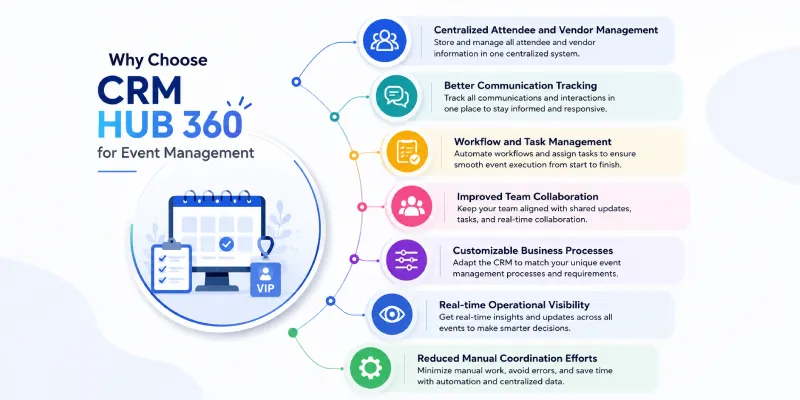
CRM HUB 360 helps event management businesses organize customer relationships, internal workflows, and operational activities within a single platform.

Key Advantages

  • Centralized attendee and vendor management
  • Better communication tracking
  • Workflow and task management
  • Improved team collaboration
  • Customizable business processes
  • Real-time operational visibility
  • Reduced manual coordination efforts
Its flexibility makes it suitable for event agencies, corporate event teams, and businesses managing multiple events and client interactions.
Running an event management business requires constant coordination, communication, and organization. Handling attendees, vendors, schedules, and internal operations manually can quickly become difficult as events grow in size and complexity.
An Event Management CRM helps businesses simplify these processes by organizing information, improving collaboration, and streamlining daily operations. With platforms like CRM HUB 360, event businesses can manage workflows more efficiently, improve customer experiences, and maintain better control over every stage of event execution.

Explore More Related Articles

Discover ways to connect with your customers with our CRM software.